Nightdream: Clock, Screensaver & Radio APK Download v2.11.44 (Latest Version) for Android
⬇ Download APK v2.11.44If you're looking for a versatile utility for your device, the Nightdream: Clock, Screensaver & Radio APK offers an engaging combination of functions. This app is designed to serve as a clock, screensaver, and radio, making it useful during both day and night.
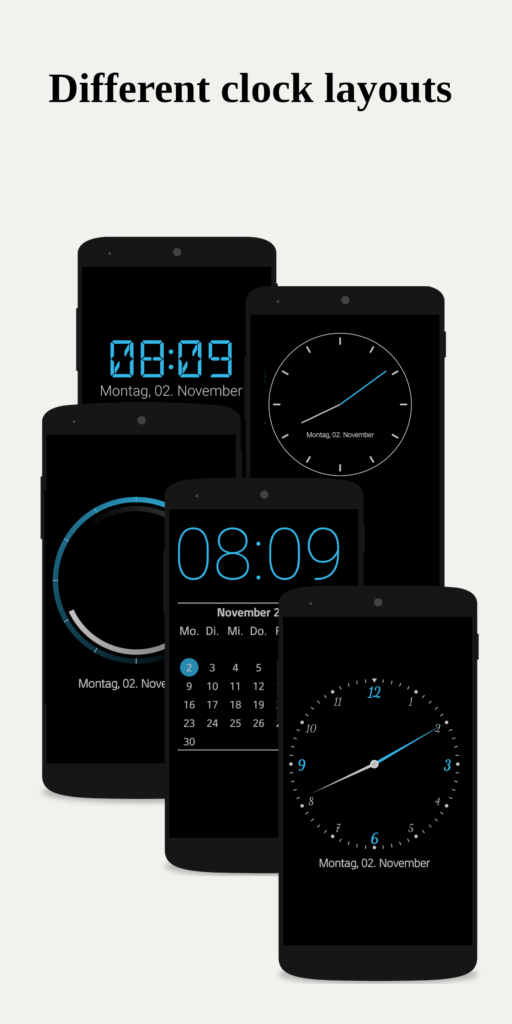
Table of Contents
About Nightdream: Clock, Screensaver & Radio APK
Nightdream functions as an open-source desk clock and screensaver, catering to users who want a customizable and multifunctional display on their Android devices. It provides a digital clock with essential information like battery level, date, and notifications, ensuring that users can access vital details at a glance. Its adaptive brightness feature is particularly appealing for nighttime viewing, as it transitions to a darker display, which is especially compatible with AMOLED screens.
Users appreciate the extensive customization options available within the app. It allows you to modify colors, fonts, and even incorporate analog watch faces into your display. This level of personalization makes it an excellent option for those who enjoy tailoring their apps to fit their aesthetic preferences. Additionally, the option to resize the clock using a two-finger zoom keeps usability simple and intuitive.
The app also comes equipped with various features beyond just telling time. Users can set alarms swiftly with a simple swipe and can even listen to internet radio stations, which can be integrated into their alarm setup. It includes provisions for Wi-Fi management to maintain uninterrupted audio streaming. Furthermore, it displays notifications from favorite applications and provides weather updates, encompassing a wide range of functionalities.
Key Features of Nightdream: Clock, Screensaver & Radio APK
- The app boasts a dark mode that optimizes visibility for users at night, displaying pure black on AMOLED screens to reduce strain on the eyes.
- Customizable design options let users adapt various aspects, including colors, fonts, and even the use of analog watch faces, for a truly personalized experience.
- With the built-in widgets feature, users can seamlessly add a clock to their home screen, making it easy to keep track of time.
- As a screensaver for devices running Android 4.2 and above, the app can turn off the screen when not in use and reactivate it based on light or sound.
- The app includes a flashlight feature, ensuring users can access a beneficial tool readily from their devices, especially during emergencies.
- Weather updates provided by the app include a five-day forecast sourced from reliable providers like OpenWeatherMap, keeping users informed about changing conditions.
Nightdream: Clock, Screensaver & Radio APK Information
| App Name | Nightdream: Clock, Screensaver & Radio |
| Package | com.firebirdberlin.nightdream.noGms |
| Version | 2.11.44 |
| Size | 5 MB |
| Requires | Android 7.0 and up |
| Category | Alarm Clock |
| Developer | Stefan Fruhner |
| License | GPL-3.0-or-later |
| Source | F-Droid |
| Last Updated | November 6, 2026 |
Download Nightdream: Clock, Screensaver & Radio APK v2.11.44
How to Install Nightdream: Clock, Screensaver & Radio APK on Android
- Download the Nightdream: Clock, Screensaver & Radio APK file from a trusted source.
- Before installation, ensure you allow installs from unknown sources in your device settings.
- Tap on the downloaded file to begin the installation process.
- Once installed, open the app to configure your settings.
Pros and Cons
Pros
- The app provides a highly customizable interface, allowing users to tailor the look and functionality to their specific preferences.
- It combines multiple features in one, functioning as a clock, screensaver, and radio, which enhances its value.
- Being open-source, it is free to use, inviting community contributions and transparency in its development.
Limitations
- To use the app, manual updates may be required as users need to sideload the APK from external sources.
- The necessity for notification access may limit functionality based on the permissions requested by individual applications.
Who Is This App For?
This app is well-suited for users who appreciate customization and multifunctionality in their clock and screensaver applications, particularly those who enjoy tech-savvy solutions.
Looking for similar apps? Browse more Alarm Clock apps or see all Android apps on APK2GO.
Frequently Asked Questions
What is Nightdream: Clock, Screensaver & Radio?
Nightdream is an open-source application that functions as a digital clock, screensaver, and internet radio, offering a range of customizable features.
Is the app free to use?
Yes, the app is free and open-source, allowing users to access its features without any cost.
Is the app safe to install?
As it is an open-source app, it is generally considered safe, but users should always download it from reputable sources to avoid any potential security issues.
How do I set an alarm?
You can quickly set alarms by swiping within the app, making it an easy process to manage your reminders.
Can I customize the appearance?
Absolutely! The app allows you to change colors, fonts, and layouts, so you can create a display that suits your preferences.
Official page: Nightdream: Clock, Screensaver & Radio official website / source