
BinClockWidget APK Download v1.1.2 (Latest Version) for Android
⬇ Download APK v1.1.2The BinClockWidget APK is an innovative home-screen widget that brings a unique take on timekeeping to your Android device. Designed with an AMOLED-friendly aesthetic, this binary-clock presentation not only showcases the time but also offers additional utility features without compromising your screen's visual appeal or battery life.
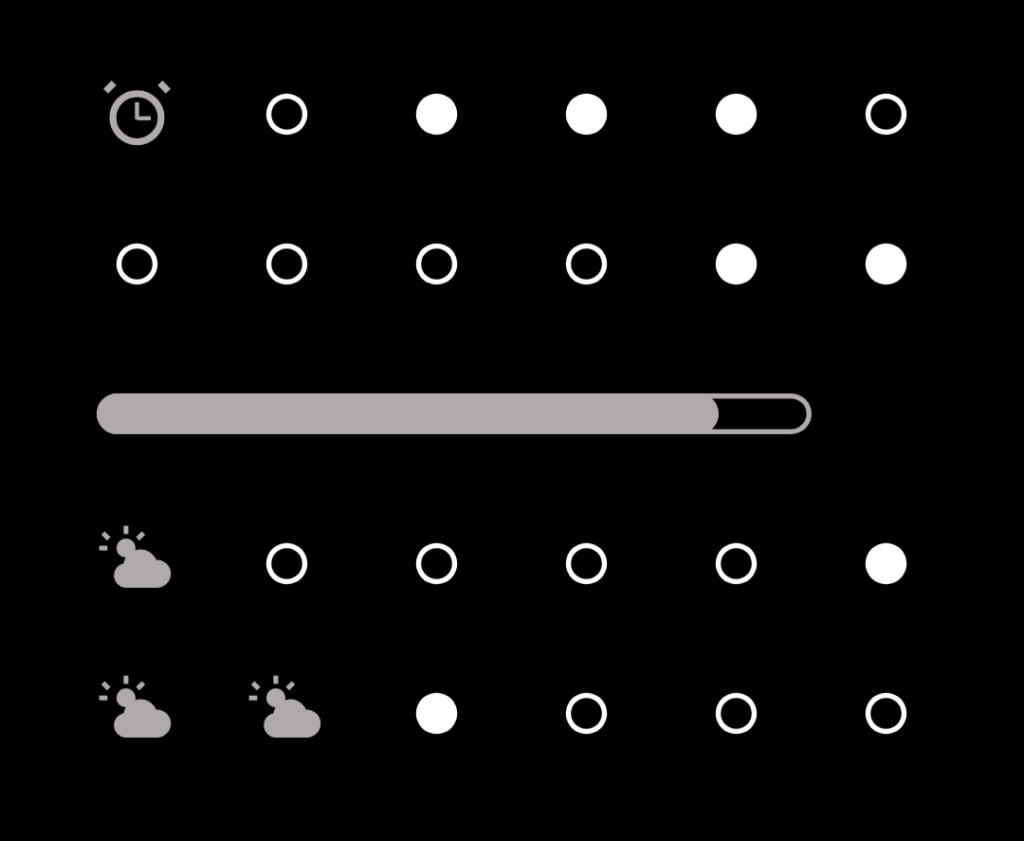
Table of Contents
About BinClockWidget APK
BinClockWidget stands out as a monochrome binary-clock home-screen widget tailored for Android devices. This application transforms the conventional method of telling time into a visually engaging format, utilizing a 6×4 grid of dots. Each row represents different time components, such as hours and minutes, while also integrating alarm state indicators and weather information. Its striking design allows it to blend seamlessly into an AMOLED wallpaper, providing a sleek and minimalistic interface.
The functionality of the app goes beyond mere time display. With its clever grid layout, it provides users not only with the current time but also helpful insights like battery level and device alarm statuses. The aesthetic is intentionally minimalist, featuring solid black dots against a true black background, making it easy on the eyes and power-efficient. This app is perfect for users who appreciate simplicity without sacrificing necessary information.
Users can easily interpret the data displayed on the widget by understanding its binary code system. The lighting of the dots indicates active values in a row, allowing users to read the time and date at a glance. The design philosophy behind BinClockWidget embraces both practicality and beauty, appealing to a wide range of Android users looking for both functionality and style in their clock faces.
Key Features of BinClockWidget APK
- BinClockWidget employs a 6×4 grid of dots, which visually represents the current time and date in a unique binary format.
- The widget allows for the display of additional information, such as the device's alarm state and current weather conditions, enhancing its utility.
- It includes a continuous battery indicator positioned between the minutes and day rows, providing users with real-time charge percentage updates.
- The app features a thoughtful design that fuses stylish aesthetics with a functional interface, allowing it to merge seamlessly with AMOLED wallpapers.
- The minimalist approach of binClockWidget ensures that it consumes minimal battery life while providing the essential functions users need.
- Users can read their time and date easily by adding up lit dots in each row, emphasizing the interactive nature of the grid.
BinClockWidget APK Information
| App Name | BinClockWidget |
| Package | fr.shiningcat.binclockwidget |
| Version | 1.1.2 |
| Size | 14 MB |
| Requires | Android 8.0 and up |
| Category | Clock |
| Developer | shining-cat |
| License | GPL-3.0-or-later |
| Source | F-Droid |
| Last Updated | November 6, 2026 |
Download BinClockWidget APK v1.1.2
How to Install BinClockWidget APK on Android
- Download the BinClockWidget APK from a reputable source like F-Droid or GitHub.
- Before installation, ensure that you allow your device to install applications from unknown sources in its settings.
- Locate the downloaded file in your device's file manager and tap to begin the installation.
- Once installed, open the app to customize and add the widget to your home screen for easy access.
Pros and Cons
Pros
- The app's design is energy-efficient, making it ideal for users with AMOLED screens.
- It provides a distinct and engaging way to tell time, appealing to those who enjoy unique interface designs.
- With its inclusion of weather and alarm status, it offers added functionality beyond simple timekeeping.
Limitations
- Users must sideload the app, as it may not be available on mainstream app stores.
- The binary format may take some time for new users to understand and read accurately.
- Updates will likely need to be managed manually, as the app may not automatically update through traditional app store channels.
Who Is This App For?
This app is suited for Android users who appreciate minimalistic design and are comfortable with binary systems for telling time. It's ideal for tech enthusiasts and those with a preference for stylish yet functional widgets.
Looking for similar apps? Browse more Clock apps or see all Android apps on APK2GO.
Frequently Asked Questions
What does BinClockWidget do?
BinClockWidget is a home-screen widget that displays time and date in a binary format using a grid of dots, along with battery status, alarm states, and weather conditions.
Is BinClockWidget free to use?
Yes, BinClockWidget is available for free, as it is released under the GPL-3.0 license, allowing users to download and use the app without cost.
Where can I download BinClockWidget safely?
The safest way to download BinClockWidget is from reputable sources such as F-Droid or GitHub, where the file is provided directly from the developer.
Is BinClockWidget safe for my device?
Yes, the app is designed for Android devices, and as long as it is downloaded from a trusted source, it poses no significant security risks.
How do I read the time on BinClockWidget?
To read the time, interpret the lit dots in each row of the grid; each row represents hours, minutes, and date, where lit dots indicate active binary values.
Official page: BinClockWidget official website / source