
cmus music player (android) APK Download v7 (Latest Version) for Android
⬇ Download APK v7The cmus music player (android) APK offers users a streamlined and efficient way to enjoy their favorite music. This lightweight music player integrates touch-friendly controls with the highly regarded cmus music player, providing a superior listening experience on Android devices.
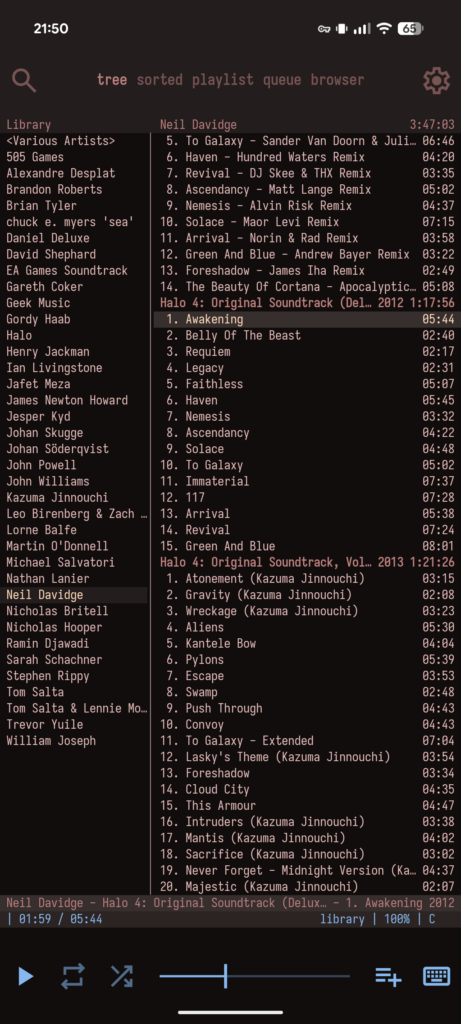
Table of Contents
About cmus music player (android) APK
cmus music player serves as an Android wrapper for the popular cmus music player, designed to enhance your music listening experience with intuitive touch controls and seamless system integration. Whether you're managing playlists or adjusting volume, the app is designed to facilitate easy navigation and control, making music management simple and enjoyable.
With an assortment of features tailored for efficiency, the app is optimized for power consumption, allowing users to enjoy music without draining their device's battery. It also supports music files from external storage, ensuring various audio formats are playable directly through the app. With its responsive interface and functionality, cmus music player is an excellent choice for music enthusiasts.
The app also focuses on creating a visually appealing experience, utilizing the Material You color scheme to match your device's aesthetic. Users can expect not only a powerful music playback tool but also additional features like album art support and a sleep timer, which enhances the application's versatility. Overall, it's a great option for users looking for a dedicated music player.
Key Features of cmus music player (android) APK
- It includes touch-responsive elements such as a top bar with a live filter, settings, and views, alongside a bottom bar with controls for play, repeat, shuffle, and volume adjustments.
- The app allows for the long-press manipulation of tracks and playlists to easily add or remove songs, making playlist management straightforward and user-friendly.
- With integrated system media controls, it automatically manages the cmus process, shutting it down when idle to conserve power, and quickly restarting upon user interaction.
- It boasts a color scheme that aligns with the Material You design, ensuring a modern look and feel while you navigate through your music library.
- For those who value precision, it supports sub-second seeking accuracy alongside continuous state saving, allowing users to pick up right where they left off.
- The app’s additional functionalities include a sleep timer, font options, and data import/export features, which enhance its usability and foster a tailored user experience.
cmus music player (android) APK Information
| App Name | cmus music player (android) |
| Package | net.pgaskin.cmus.android |
| Version | 7 |
| Size | 7 MB |
| Requires | Android 14 and up |
| Category | Local Media Player |
| Developer | Patrick Gaskin |
| License | GPL-2.0-only |
| Source | F-Droid |
| Last Updated | November 4, 2026 |
Download cmus music player (android) APK v7
How to Install cmus music player (android) APK on Android
- Download the cmus music player (android) APK from the F-Droid website or the official repository.
- Before installation, ensure your device allows installs from unknown sources by adjusting the settings.
- Locate the downloaded APK file and tap on it to initiate the installation process.
- After installation, open the app to begin exploring its features and start listening to your music.
Pros and Cons
Pros
- The app features a sleek, touch-friendly interface that enhances user interactions, making navigation intuitive and easy.
- With excellent system integration, it saves power by managing processes efficiently while maintaining music playback quality.
- Its variety of features like album art support and a sleep timer provide added functionality that appeals to diverse user preferences.
Limitations
- Users may need to manage updates manually, as the app does not automatically update through the Google Play Store.
- As an APK, it requires a sideloading process which may not be familiar to all users and could lead to concerns about security.
Who Is This App For?
The app is ideal for music lovers looking for a compact and efficient way to manage their music library on Android devices. It's suitable for those who appreciate a customizable and power-efficient music player.
Looking for similar apps? Browse more Local Media Player apps or see all Android apps on APK2GO.
Frequently Asked Questions
What is cmus music player used for?
cmus music player is used for playing and managing music files on Android devices, offering an intuitive interface and system integration for ease of use.
Is it free to use?
Yes, cmus music player is available for free as it operates under the GPL-2.0-only license, ensuring users can download and use it without any cost.
Where does the APK come from?
The cmus music player (android) APK is sourced from F-Droid, a trustworthy platform for open-source Android applications, ensuring a safe download.
Is the app safe to install?
As the app is hosted on F-Droid and is open-source, it is generally considered safe to install. Always ensure your device settings allow for authenticated installations.
How do I customize my music experience?
You can customize your music experience in cmus music player by adjusting settings like font options, and utilizing features such as album art and equalizer settings for an enhanced audio experience.
Official page: cmus music player (android) official website / source