
Amaze File Manager APK Download v3.11.4 (Latest Version) for Android
⬇ Download APK v3.11.4Amaze File Manager APK provides users with a lightweight and open-source solution for managing files efficiently. Following Material Design guidelines, this app enhances user experience with a clean and intuitive interface, perfect for users who appreciate streamlined design and functionality.
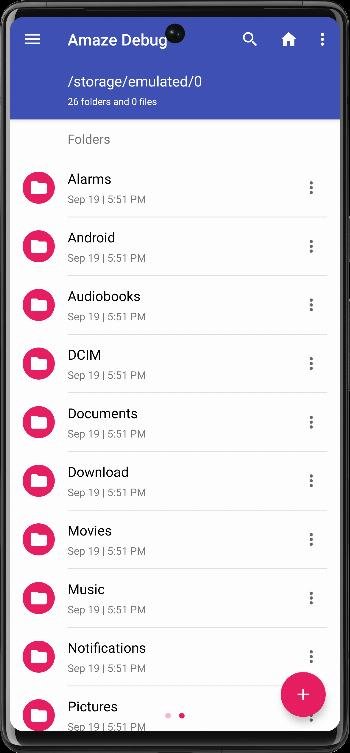
Table of Contents
About Amaze File Manager APK
Amaze File Manager is a versatile file management tool that caters to the needs of users looking for a simple yet powerful way to handle their files. As an open-source application, it invites contributions from the community, ensuring that it remains up-to-date and relevant for all users. Whether you want to organize files, manage apps, or explore advanced features, the app can effectively meet your needs.
The app is particularly useful for those who require seamless access to files across various locations. From local storage to cloud services using protocols such as SMB, FTP, and SSH, Amaze File Manager facilitates easy navigation and management of diverse file types. Users can also benefit from the app's user-friendly interface, which provides quick access to history, bookmarks, and a search function.
For advanced users, this file manager offers features such as a root explorer for direct access to system files. Security is also a crucial element, with AES encryption and decryption capabilities available for keeping sensitive files protected. Overall, Amaze File Manager merges functionality and security, making it an excellent choice for managing files on Android devices.
Key Features of Amaze File Manager APK
- With features like cut, copy, delete, compress, and extract functions, the app provides a comprehensive suite for file management tasks.
- Multiple tabs enable users to enhance productivity by allowing simultaneous access to various directories without the need to switch back and forth.
- A navigation drawer simplifies moving between different sections of the application, making it easier to manage files and navigate quickly.
- The integrated app manager lets users open, backup, or uninstall applications directly, streamlining app management on their devices.
- Advanced users can utilize the root explorer feature to access system files, manipulating them with greater control and customization.
- For additional functionality, the app supports AES encryption and decryption for securing files, along with integrated support for ZIP/RAR readers, a database reader, and a text editor.
Amaze File Manager APK Information
| App Name | Amaze File Manager |
| Package | com.amaze.filemanager |
| Version | 3.11.4 |
| Size | 11 MB |
| Requires | Android 6.0 and up |
| Category | System |
| Developer | Team Amaze |
| License | GPL-3.0-only |
| Source | IzzyOnDroid |
| Last Updated | October 15, 2026 |
Download Amaze File Manager APK v3.11.4
How to Install Amaze File Manager APK on Android
- Download the Amaze File Manager APK from a trusted source.
- Enable installation from unknown sources in your device settings to allow app installation.
- Once the download is complete, locate the downloaded file and tap it to begin the installation process.
- Follow the prompts to install the app on your Android device.
- After installation, open the app to start managing your files efficiently.
Pros and Cons
Pros
- The app adheres to Material Design, creating an aesthetically pleasing and user-friendly experience.
- Being open-source allows for community input and improvement, ensuring continuous updates and innovations.
- It offers a wide range of features including compression, encryption, and a built-in app manager that enhance file handling capabilities.
Limitations
- Updates must be manually managed, which may not appeal to those who prefer automated software updates.
- The need to sideload the app means that users must take additional steps to install it compared to apps available on the Google Play Store.
- Limited information on user reviews or feedback may make new users hesitant before trying the application.
Who Is This App For?
This app is ideal for Android users who value a simple, efficient file management solution with security features, as well as advanced functionality for power users.
Looking for similar apps? Browse more System apps or see all Android apps on APK2GO.
Frequently Asked Questions
What does Amaze File Manager do?
Amaze File Manager helps users manage their files on Android devices, providing functions for viewing, organizing, and transferring files effectively across local and cloud storage.
Is Amaze File Manager free?
Yes, the app is completely free to download and use, making it accessible for anyone looking for a file management solution.
Is it safe to use Amaze File Manager?
As an open-source app, Amaze File Manager is generally considered safe, but users should always download APKs from reputable sources to avoid security risks.
How do I use the root explorer feature?
To use the root explorer, you need to grant the app root permissions, which allows you to access and manage system files, enhancing your control over your device.
Can I use cloud storage with Amaze File Manager?
Yes, the app supports various cloud services such as SMB, SSH, FTP, and SFTP, enabling seamless file transfers between the cloud and your device.
Official page: Amaze File Manager official website / source