
AutoPie APK Download v0.20.3-beta (Latest Version) for Android
⬇ Download APK v0.20.3-betaThe AutoPie APK is a unique application that transforms Linux commands into usable Android apps. This innovative tool caters to users seeking to automate tasks on their devices using familiar scripting languages, expanding the capabilities of what their Android devices can accomplish.
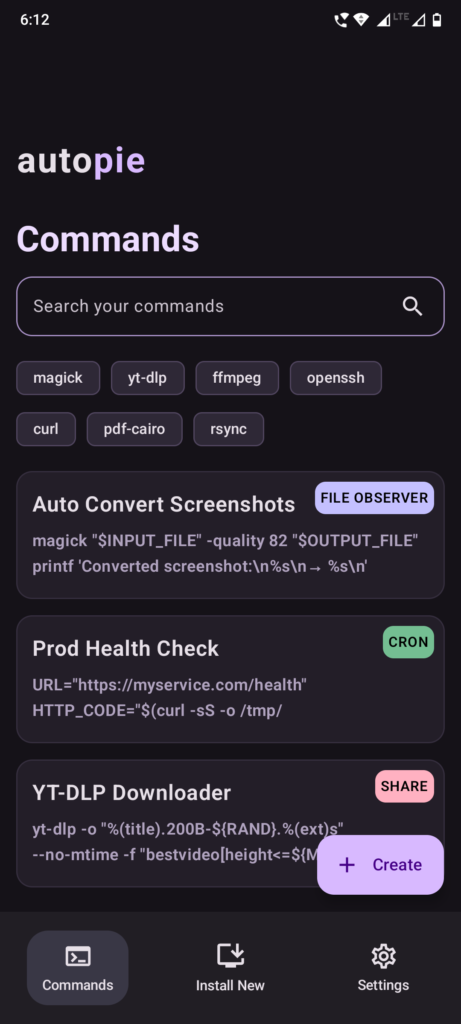
Table of Contents
About AutoPie APK
AutoPie serves as a command automation hub specifically designed for Android users who are familiar with Linux. By providing a Linux-like environment, the app allows users to run and automate Bash commands and Python scripts seamlessly without requiring a traditional terminal. This tool caters to tech enthusiasts, programmers, and anyone eager to improve their productivity on Android devices.
With AutoPie, users can create small yet powerful utilities for various tasks, including file conversion, data monitoring, and automated backups. It streamlines complex workflows by enabling users to engage with Linux packages and scripts directly on their mobile devices, making it ideal for users looking to perform intricate operations with ease.
The app not only simplifies the execution of scripts but also aids in the creation of custom applets for daily tasks. Users can access these applets from their home screen, enhancing their interaction with the device. AutoPie fosters an efficient way to implement useful tools, thus maximizing the productivity potential of Android devices.
Key Features of AutoPie APK
- The app includes an integrated Termux environment, which allows users to run Linux commands directly without needing to access a terminal interface.
- With AutoPie, users can install additional Termux packages as needed using simple command lines, significantly expanding the app's functionality.
- It supports Python out of the box, allowing for the installation of Python packages using the pip command, which is essential for Python programming.
- Users can create custom applets that reside on their home screen, letting them tailor their app environment to fit their specific needs.
- The app allows users to automate tasks by scheduling commands in a cron-style setup, which is instrumental for maintaining regular tasks and processes.
- AutoPie provides an interactive command mode, enabling users to execute scripts that require a live shell session, which can be essential in various practical scenarios.
AutoPie APK Information
| App Name | AutoPie |
| Package | com.autopi |
| Version | 0.20.3-beta |
| Size | 76 MB |
| Requires | Android 8.1 and up |
| Category | Development |
| Developer | Amal Shaji |
| License | Apache-2.0 |
| Source | F-Droid |
| Last Updated | October 31, 2026 |
Download AutoPie APK v0.20.3-beta
How to Install AutoPie APK on Android
- Download the AutoPie APK from a trusted source like F-Droid.
- Allow installations from unknown sources in your device settings to enable the app's installation.
- Locate the downloaded file in your file manager and tap on it to begin the installation process.
- Once installed, open the app to start utilizing its features and create your own scripts and applets.
Pros and Cons
Pros
- The app provides a flexible environment for users familiar with Linux, enabling them to leverage their existing knowledge for Android device automation.
- AutoPie fosters creativity by allowing users to custom design applets tailored to their specific tasks and workflows.
- Its integrated tools facilitate seamless execution and automation of commands, making complex tasks easier and more manageable.
Limitations
- Users need to manually update the app since it may not automatically check for or apply updates.
- The app requires sideloading since it is not available on conventional app distribution platforms, which may hinder accessibility for some users.
Who Is This App For?
This app is suitable for tech enthusiasts, developers, and anyone comfortable with Linux who wishes to leverage scripting to enhance productivity in their day-to-day mobile tasks.
Looking for similar apps? Browse more Development apps or see all Android apps on APK2GO.
Frequently Asked Questions
What does AutoPie do?
AutoPie allows users to create and automate scripts and commands within an Android environment, using familiar Linux commands and programming languages like Python.
Is AutoPie free to use?
Yes, the app is available for free download and usage through sources like F-Droid, adhering to an open-source model.
Is the AutoPie APK safe to install?
When downloaded from trusted sources, such as F-Droid or its GitHub repository, the AutoPie APK is considered safe. Always ensure to check the source for authenticity.
Can I use AutoPie without programming knowledge?
While basic programming skills can enhance the use of AutoPie, it also offers templates and easy-to-create applets, making it accessible to novice users interested in automation.
What platforms support the AutoPie app?
AutoPie is designed for Android devices, providing functionality that replicates a Linux environment for users familiar with command line operations.
Official page: AutoPie official website / source