
HeliBoard APK Download v4.2 (Latest Version) for Android
⬇ Download APK v4.2HeliBoard APK is a customizable keyboard application that offers users a privacy-focused typing experience. As an open-source tool based on AOSP and OpenBoard, it caters to those wanting a versatile input method without internet reliance, appealing to individuals desiring enhanced privacy and personalization in their typing routines.
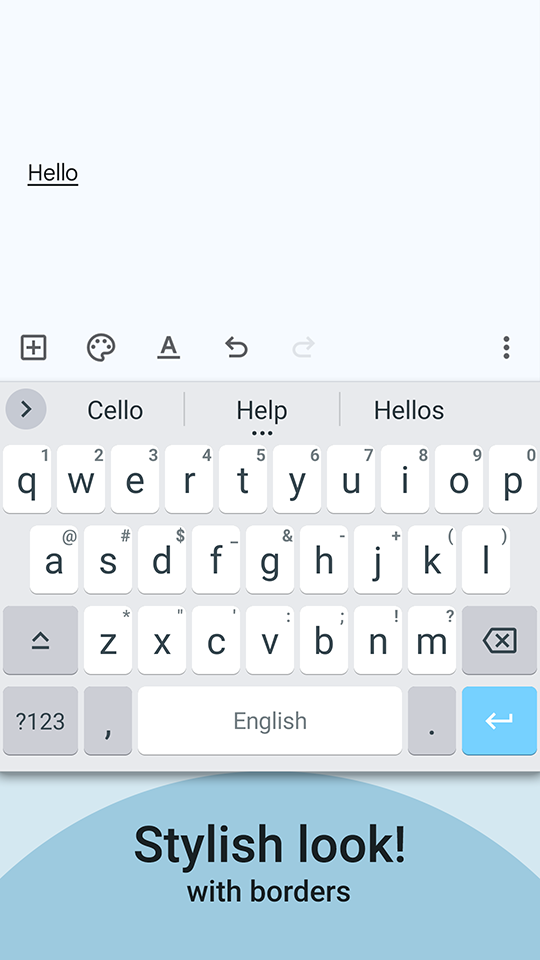
Table of Contents
About HeliBoard APK
HeliBoard is designed as a powerful open-source keyboard for Android devices, enabling users to tailor their typing experience extensively. This app prioritizes user privacy by functioning entirely offline, avoiding any internet access permissions, ensuring that your typing data remains securely on your device. As a customizable tool, it not only enhances everyday typing but also allows users to adapt the keyboard to their personal preferences.
With the ability to add various dictionaries, HeliBoard assists users in spell checking and suggesting words during their typing sessions. This adaptability is particularly useful for multilingual users, as it facilitates seamless typing in multiple languages. Additionally, the app supports special layouts that include symbols and functional keys, making it suitable for diverse typing needs and scenarios.
The app also focuses on aesthetic customization, allowing users to modify themes, colors, and background images while matching their device's day/night settings. By catering to individual tastes, HeliBoard creates a more enjoyable typing atmosphere. Users looking for specific emojis or scientific symbols will find enhanced functionality as the app provides suggestions tailored to their unique language and typing styles.
Key Features of HeliBoard APK
- HeliBoard offers an extensive range of customizable options that allow users to create their own keyboard themes, adjusting colors and backgrounds for a personalized touch.
- Dictionaries can be added for improved suggestions and spell checking, enabling users to build their own from scratch or select from an experimental section with varying quality.
- The keyboard supports multilingual typing, ensuring that users can switch between languages effortlessly while maintaining a smooth typing experience.
- Users can enable glide typing, which allows words to be formed by sliding fingers across the keyboard, although this feature requires a closed-source library not included with the app.
- With its unique offline capabilities, HeliBoard does not require any internet permission, making it a perfect choice for those concerned about data privacy.
- The app provides customizable layouts, including distinct options for special characters and functional keys, catering to diverse user needs in a customizable format.
HeliBoard APK Information
| App Name | HeliBoard |
| Package | helium314.keyboard |
| Version | 4.2 |
| Size | 21 MB |
| Requires | Android 5.0 and up |
| Category | Keyboard & IME |
| Developer | N/A |
| License | GPL-3.0-only |
| Source | F-Droid |
| Last Updated | October 25, 2026 |
How to Install HeliBoard APK on Android
- Download the HeliBoard APK from a trusted source like F-Droid or its official GitHub repository.
- Before installing, ensure your device allows installations from unknown sources in the settings.
- Tap the downloaded HeliBoard APK file to start the installation process.
- Once installed, open the app to begin customizing your keyboard settings and layouts.
Pros and Cons
Pros
- Features a highly customizable interface that allows users to personalize their keyboard's look and functionality according to individual preferences.
- Prioritizes user privacy by operating completely offline and without requiring internet permissions, protecting user data effectively.
- Supports multilingual typing and offers a variety of dictionaries for enhanced suggestions and spell check capabilities.
Limitations
- Users may need to manually download updates since the app does not offer automatic updates or play store availability.
- The glide typing feature is limited as it relies on a closed-source library that isn’t included with the install, potentially affecting usability for some.
- The app does not have extensive built-in dictionaries, which may require users to invest time in finding or creating their own.
Who Is This App For?
HeliBoard is ideal for users seeking a private, customizable typing experience on their Android devices. It particularly suits those who value aesthetic personalization and need multilingual support while typing.
Looking for similar apps? Browse more Keyboard & IME apps or see all Android apps on APK2GO.
Frequently Asked Questions
What is HeliBoard APK?
HeliBoard APK is an open-source keyboard app for Android that emphasizes user privacy and offers extensive customization options to enhance typing experiences.
Is HeliBoard free to use?
Yes, HeliBoard is completely free to download and use, making it accessible for anyone looking for a versatile keyboard without costs associated.
Is my data safe with HeliBoard?
Absolutely. The app does not require internet permission, meaning your typing data remains securely stored on your device without external tracking.
Where can I download HeliBoard APK?
You can download HeliBoard APK from platforms like F-Droid or its official GitHub repository, ensuring you get the latest version directly from the source.
How do I customize my keyboard in HeliBoard?
You can customize your keyboard by adjusting themes, colors, and layouts available within the app settings, allowing for a tailored typing experience that matches your needs.
Official page: HeliBoard official website / source