
Key Mapper APK Download v4.6.2-foss (Latest Version) for Android
⬇ Download APK v4.6.2-fossIf you're looking to optimize your device's functions, the Key Mapper APK might just be the solution for you. This app offers an impressive range of remapping capabilities that let users create shortcuts for a variety of actions, effectively enhancing their overall Android experience.
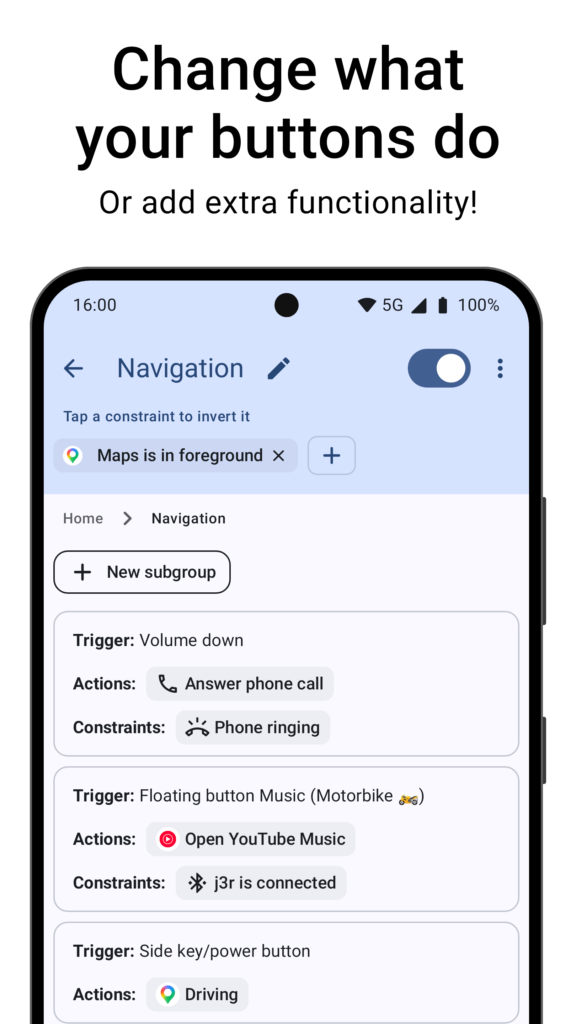
Table of Contents
About Key Mapper APK
Key Mapper is a versatile application designed to help users customize button functions on their Android devices. With its intuitive interface, the app allows you to remap virtually any button, including volume, power, keyboard, and even gamepad controls. This capability enables you to create unique shortcuts for specific tasks, streamlining your interactions with your device.
Users can create custom macros and on-screen buttons across various applications, adding new layers of functionality to their existing buttons. With the ability to design layouts that suit individual preferences, Key Mapper adapts to different usage scenarios, making it a perfect companion for gamers, productivity enthusiasts, and anyone who wishes to simplify their device usage.
The app supports a wide range of input devices, including game controllers, keyboards, and even headsets, making it particularly useful for customizing mobile gaming experiences. Users can trigger key maps through different methods, allowing flexible control over how they interact with their devices, accommodating various workflows or gaming styles.
Key Features of Key Mapper APK
- Key Mapper allows users to remap all phone buttons, including volume and side buttons, ensuring you have total control at your fingertips.
- The app supports a diverse range of devices, such as game controllers and keyboards, making it extremely flexible for different types of users.
- Users can design custom on-screen button layouts and remap them, perfectly mimicking real keys for enhanced usability.
- With over 100 individual actions to choose from, the app allows for the creation of complex macros that include screen taps, gestures, and keyboard inputs.
- You have the option to dictate how triggers work, from long presses to double taps, personalizing your interactions based on your preference.
- The app features a user-friendly interface for configuring specific macros and setting delays, enabling you to automate tasks and streamline your activities effortlessly.
Key Mapper APK Information
| App Name | Key Mapper |
| Package | io.github.sds100.keymapper |
| Version | 4.6.2-foss |
| Size | 14 MB |
| Requires | Android 8.0 and up |
| Category | Keyboard & IME |
| Developer | sds100 |
| License | GPL-3.0-only |
| Source | F-Droid |
| Last Updated | October 27, 2026 |
Download Key Mapper APK v4.6.2-foss
How to Install Key Mapper APK on Android
- Download the Key Mapper APK from a trusted source like F-Droid or the project repository.
- Before installation, ensure that your device allows installations from unknown sources via the settings.
- After downloading, locate and tap the APK file to begin the installation process.
- Once installed, open the app to start remapping your buttons and creating shortcuts.
Pros and Cons
Pros
- Highly customizable, allowing users to tailor their device functions according to their specific needs.
- Supports a wide variety of buttons and devices, enhancing usability for both casual and advanced users.
- The interface is user-friendly, making it accessible even for those who may not be tech-savvy.
Limitations
- The app may need to be sideloaded from sources outside the Play Store, requiring users to allow such installations in their settings.
- Users might encounter limitations with certain devices and input types, which are not universally supported.
- Manual updates may be necessary, as the app does not receive automatic updates from the Play Store.
Who Is This App For?
Key Mapper is well-suited for anyone looking to enhance their Android device's functionality, whether that be gamers, productivity users, or tech enthusiasts who enjoy customizing their experience.
Looking for similar apps? Browse more Keyboard & IME apps or see all Android apps on APK2GO.
Frequently Asked Questions
What does Key Mapper do?
Key Mapper allows users to remap device buttons for various functionalities, creating shortcuts and custom macros that streamline device interaction.
Is Key Mapper free?
Yes, Key Mapper is available for free under the GPL-3.0 license, allowing users to download and use it without any associated costs.
Is Key Mapper safe to use?
Yes, provided the APK is downloaded from trusted sources like F-Droid, Key Mapper is safe to use. Always be cautious with unknown sources.
How can Key Mapper enhance my gaming experience?
By allowing users to remap buttons on game controllers and create custom on-screen controls, Key Mapper can significantly improve responsiveness and accessibility during gaming.
Can I create multiple macros for different tasks?
Absolutely! Key Mapper supports over 100 actions and allows the creation of complex macros tailored to various tasks, helping automate repetitive actions.
Official page: Key Mapper official website / source