
Music APK Download v0.3.0 (Latest Version) for Android
⬇ Download APK vv0.3.0Those seeking a streamlined audio experience can benefit from the Music APK, an offline player designed to enhance listening without unnecessary distractions. This app excels at managing your music library, ensuring that you have quick and efficient access to your files without any online connectivity required.
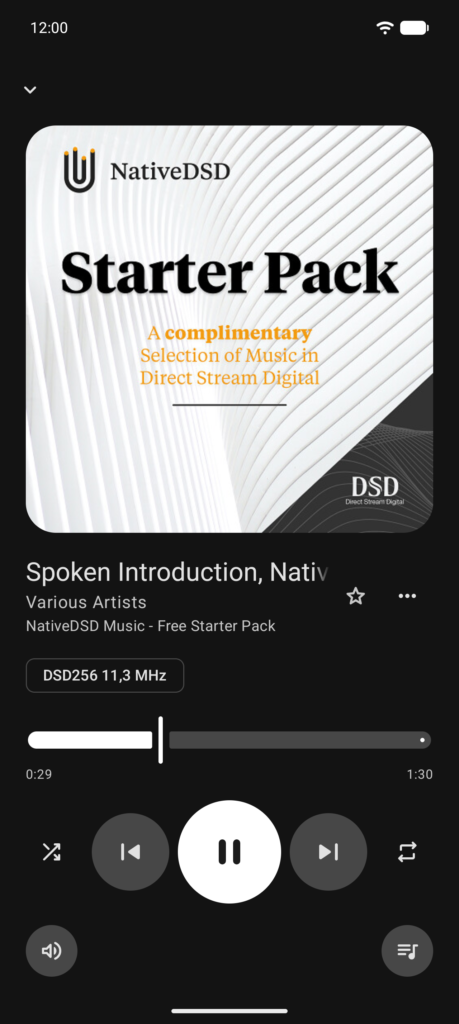
Table of Contents
About Music APK
The app is designed for audio enthusiasts who prefer to manage their music collections locally without the interference of online features. It allows users to select specific folders containing audio files, creating a tailored experience that prioritizes user control and simplicity. Your music library is fully maintained on your device, ensuring privacy and convenience.
With various audio formats supported, the app caters to a wide range of preferences, from those who enjoy compressed files like MP3s to high-resolution audio like DSD. The emphasis on gapless playback ensures an uninterrupted listening experience, making it ideal for albums where continuity is essential. Additionally, it provides users with the flexibility to customize their listening experience through features like a parametric equalizer.
The lack of internet permissions means this app focuses solely on offline functionality, reinforcing its suitability for individuals looking for a reliable player without data usage concerns. As the app keeps track of your most played tracks and newly added music, it adapts to your listening habits, making it easy to discover favorites at a glance. Overall, this application merges quality sound with user-centric features.
Key Features of Music APK
- It supports a variety of audio formats including FLAC, ALAC, AAC, MP3, and DSD, ensuring a versatile playback experience suitable for different audio preferences.
- Users can take advantage of a parametric equalizer, allowing for personalized sound customization and the ability to import equalizer settings from other applications while playing.
- With bit-perfect output for USB DACs, audio is sent unchanged at the file's native sample rate, delivering high fidelity for audiophiles focused on sound quality.
- The app features a smart library that organizes albums, artists, and playlists according to user preferences, and facilitates a search function that disregards diacritics.
- ReplayGain functionality comes in multiple forms, allowing automatic control of playback levels while preventing distortion, which can be crucial for maintaining audio quality.
- A queue feature makes it easy to reorder tracks, displaying options for shuffle and repeat, thus enhancing user experience during playback sessions.
Music APK Information
| App Name | Music |
| Package | sh.hnet.music |
| Version | v0.3.0 |
| Size | 5 MB |
| Requires | Android 14 and up |
| Category | Local Media Player |
| Developer | Legal HKr |
| License | GPL-3.0-only |
| Source | F-Droid |
| Last Updated | November 17, 2026 |
How to Install Music APK on Android
- Download the Music APK file from a trusted source such as F-Droid.
- Ensure you enable installations from unknown sources in your device settings to allow the installation process.
- Once downloaded, tap the file to initiate the installation and follow the on-screen instructions.
- After installation, find the app in your app drawer and open it to start managing your music library.
Pros and Cons
Pros
- The app operates completely offline, which enhances user privacy and minimizes data usage.
- Music offers a highly customizable audio experience through its extensive equalizer settings that cater to various audio devices.
- Its user-friendly interface makes it easy to organize and play music directly from your chosen folders without complexity.
- With broad format support, it accommodates both casual listeners and audiophiles who demand higher quality audio playback.
Limitations
- The app requires manual updates, as it does not provide automated notifications for new features or improvements.
- Users must download the app externally and sideload it onto their devices, which may pose challenges for less tech-savvy individuals.
- There are limitations concerning online functionalities, which may not suit users looking for streaming capabilities.
Who Is This App For?
This app is perfect for audiophiles and music enthusiasts who prefer to keep their collections organized on-device and focus on quality playback without relying on streaming services.
Looking for similar apps? Browse more Local Media Player apps or see all Android apps on APK2GO.
Frequently Asked Questions
What audio formats does the Music app support?
The app supports a variety of formats including FLAC, ALAC, AAC, MP3, Ogg Vorbis, Opus, and DSD, catering to different listening preferences.
Is the Music APK free to use?
Yes, the Music APK is free to download and use, with no hidden costs involved for its features.
Where can I download the Music app safely?
You can download the app from reputable sources like F-Droid, ensuring safety and authenticity in the installation process.
Does the app require internet access?
No, the app operates entirely offline, meaning users do not need an internet connection to play their music.
How can I customize my listening experience in the Music app?
The app allows you to adjust sound settings using its parametric equalizer, enabling you to personalize the audio output based on your preferences.
Official page: Music official website / source