
Circle to Share APK Download v0.3.3 (Latest Version) for Android
⬇ Download APK v0.3.3For anyone looking to streamline the process of taking and sharing screenshots, the Circle to Share APK offers a sleek solution. This app enables users to effortlessly capture screen content, crop it, and then share or save the result with minimal fuss.
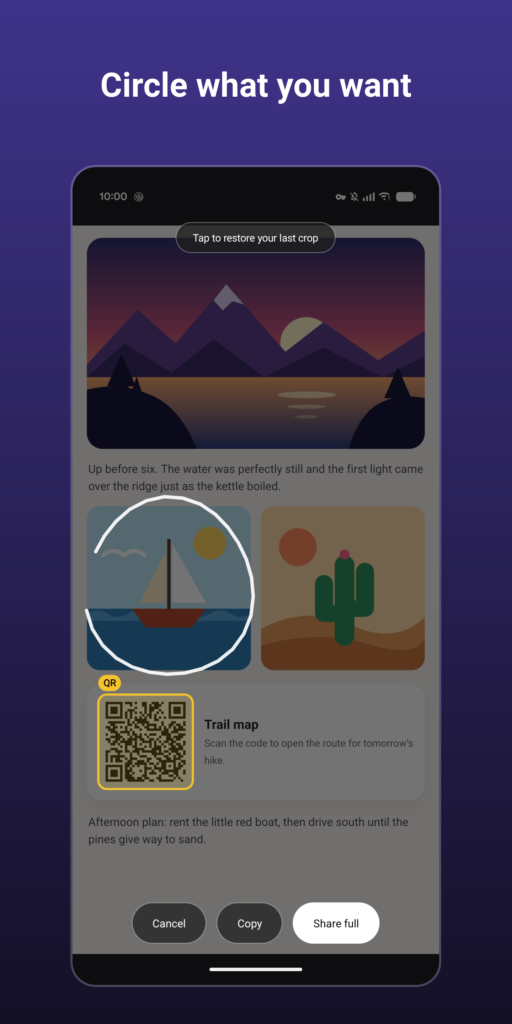
Table of Contents
About Circle to Share APK
Circle to Share is a user-friendly app designed for capturing screenshots with an intuitive cropping feature. Users can take a snapshot of what is displayed on their screen at any moment, allowing for greater flexibility when sharing information. The app ensures that nothing is saved on the device unless the user specifically opts to save it, enhancing privacy and convenience.
Once activated, the app freezes the current screen, providing users with the ability to circle the desired content seamlessly. This targeted approach not only makes sharing easier but also ensures that users avoid cluttering their gallery with unnecessary images. The app is designed to facilitate quick sharing, copying, or saving of screenshots without the hassle of managing excess files.
The app can be accessed in multiple ways, including a special quick settings tile and a floating bubble that remains active across different apps. It limits permissions to enhance privacy, requesting only what's necessary for operation. This makes it an ideal choice for productivity-focused individuals who value quick and effective screen capturing.
Key Features of Circle to Share APK
- With Circle to Share, users can capture their screen by using various triggering methods such as the power button, corner swipe, or through a floating bubble that always remains on the screen.
- The app features a cropping tool that allows users to easily select specific areas of the screenshot, ensuring that only the desired content is captured and shared.
- Users benefit from enhanced privacy as captured images are not saved automatically; only those explicitly saved by the user are stored in the devices' screenshots folder.
- The app conveniently highlights any QR codes in the captured images, providing users with the option to open, copy, or share them directly from the screenshot.
- An optional snapping feature aligns cropped edges with buttons, cards, and images on the screen, streamlining the editing process and enhancing user experience.
- Circle to Share does not require any permissions related to internet access, storage, or location, making it a secure option for users who are cautious about app access.
Circle to Share APK Information
| App Name | Circle to Share |
| Package | eu.woshicado.circletoshare |
| Version | 0.3.3 |
| Size | 5 MB |
| Requires | Android 11 and up |
| Category | Graphics |
| Developer | Woshicado |
| License | GPL-3.0-or-later |
| Source | F-Droid |
| Last Updated | November 4, 2026 |
Download Circle to Share APK v0.3.3
How to Install Circle to Share APK on Android
- Download the Circle to Share APK from a trusted source like F-Droid.
- Ensure that you allow installations from unknown sources in your device settings.
- Tap on the downloaded file to start the installation process.
- Once installed, open the app to start capturing and sharing screenshots effortlessly.
Pros and Cons
Pros
- The app is efficient in capturing and sharing images without cluttering the device with unnecessary saved files.
- Users appreciate the enhanced privacy since nothing is stored until explicitly saved.
- The intuitive interface and multiple activation methods make the app accessible and user-friendly.
- It's lightweight and does not request unnecessary permissions, which is ideal for privacy-conscious users.
Limitations
- The app may require manual updates since it's not available on traditional app stores.
- Users need to sideload the application, which can be a barrier for those unfamiliar with the process.
- Limited details might be provided in the app regarding specific features or future enhancements.
Who Is This App For?
Circle to Share is well-suited for individuals who frequently share visual information and want a straightforward way to capture specific details on their screens. It's ideal for students, professionals, and anyone who values efficiency in sharing content.
Looking for similar apps? Browse more Graphics apps or see all Android apps on APK2GO.
Frequently Asked Questions
What does Circle to Share do?
Circle to Share allows users to capture screenshots from their device, crop the content they wish to keep, and share or save it directly with minimal hassle.
Is Circle to Share free?
Yes, the app is free to download and use, providing a convenient tool for users without any associated costs.
Is Circle to Share safe to use?
The app prioritizes user privacy and security, requiring no unnecessary permissions and only accessing what is needed for its functionality.
How do I use this app effectively?
To use Circle to Share effectively, trigger it using the designated methods, crop the desired content, and choose to share, copy, or save according to your needs.
Where can I download Circle to Share?
You can find Circle to Share available for download on repositories like F-Droid, where users can obtain the APK file safely.
Official page: Circle to Share official website / source