
Canta APK Download v4.0.0 (Latest Version) for Android
⬇ Download APK v4.0.0For users looking to optimize their Android devices, the Canta APK offers a unique solution for uninstalling apps without needing root access. This application enables a streamlined way to manage software, enhancing performance and freeing up space. Understanding its functionality and setup is essential for effective use.
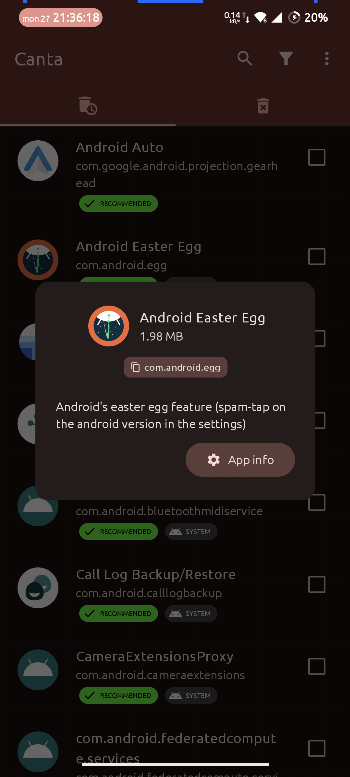
Table of Contents
About Canta APK
Canta is an innovative app designed to help Android users uninstall applications from their devices without requiring root access. It simplifies the often complex task of managing installed software, allowing for easier device customization and space management. Users can take control over unwanted applications and enhance their device's performance.
To effectively use Canta, it is important to have Shizuku installed and activated, which provides the necessary framework for Canta to function as intended. This requirement enables deeper management capabilities without the risks associated with rooting a device. Following the provided setup guide ensures a smooth and efficient experience.
The app utilizes a universal debloat list to assist users in identifying which applications to remove, based on community recommendations. While it provides an easy way to uninstall apps, users are reminded to proceed with caution; incorrect deletions may lead to device instability. The app aims to improve the overall Android experience by allowing for better app management.
Key Features of Canta APK
- Canta allows the removal of any app from your Android device without the need for root access, simplifying the uninstall process for users.
- Users must first set up Shizuku before using Canta, which enhances the app's functionality by providing required permissions.
- The app depends on a universal debloat list to help users identify which applications are safe or recommended for removal.
- Canta is designed to prevent device bricking, although caution is advised when removing essential applications to avoid bootloop issues.
- The app is developed under the LGPL-3.0-or-later license, ensuring that users have permissions to use and modify it.
- Canta is categorized within the system apps, making it an essential tool for those looking to optimize their device's operational efficiency.
Canta APK Information
| App Name | Canta |
| Package | io.github.samolego.canta |
| Version | 4.0.0 |
| Size | 5 MB |
| Requires | Android 9 and up |
| Category | System |
| Developer | Samo Hribar |
| License | LGPL-3.0-or-later |
| Source | IzzyOnDroid |
| Last Updated | October 2, 2026 |
How to Install Canta APK on Android
- Download the Canta APK from its official repository or a trusted source.
- Before installation, ensure that your device allows installations from unknown sources in the settings.
- Tap on the downloaded Canta APK file to begin the installation process.
- Once installed, open the app and follow the prompts to set up Shizuku.
Pros and Cons
Pros
- Enables app uninstallation without requiring root access, making it user-friendly for all Android users.
- Utilizes community feedback for a universal debloat list, helping users make informed decisions about app removal.
- Prevents bricking issues common with rooting methods, ensuring a safer experience.
Limitations
- Users must invest time in properly setting up Shizuku, which may be confusing for some.
- Limited details are provided about specific recommendations, requiring users to exercise judgment when uninstalling apps.
- Being a sideloaded app, updates are not automatic and require manual downloads.
Who Is This App For?
Canta suits Android users looking for a straightforward approach to manage and uninstall apps without delving into complex root processes. It's particularly useful for those who want to declutter their devices safely.
Looking for similar apps? Browse more System apps or see all Android apps on APK2GO.
Frequently Asked Questions
What does Canta do?
Canta allows users to uninstall applications from their Android devices without needing root access. This makes it easier for individuals to manage their installed software and free up space.
Is Canta free to use?
Yes, Canta is available for free, allowing users to manage their apps without incurring any costs, which is beneficial for those on a tight budget.
Is Canta safe to use?
Canta is designed to safely help users remove apps by utilizing a universal debloat list, but it's essential for users to be cautious about which apps they choose to uninstall.
Where does the Canta file come from?
The Canta APK is sourced from its official repository on GitHub, ensuring that users have access to the latest and most secure version of the app.
How do I use Canta effectively?
To use Canta effectively, follow the setup instructions to activate Shizuku and refer to the universal debloat list to make informed decisions about which apps to remove.
Official page: Canta official website / source